Key Takeaways
- CRM-ERP integration connects your Customer Relationship Management (CRM) system directly to your Enterprise Resource Planning (ERP) system, giving sales real-time production capacity data during quoting and automatically routing accepted orders to production without manual reentry.
- Real-time capacity visibility during quoting prevents overcommitment and helps sales make delivery promises that production can actually keep.
- Automatic order routing from CRM to ERP eliminates manual entry errors and speeds order-to-production handoffs.
- Bidirectional schedule updates keep sales and production aligned when priorities shift or delays occur.
- A unified dashboard showing pipeline against capacity helps you balance new business against existing workload.
CRM-ERP integration for manufacturing connects your CRM system directly to your ERP system, giving sales real-time production capacity data during quoting and automatically routing accepted orders to production without manual reentry.
You are running a quote for a new customer. Sales wants to promise a two-week turnaround. You check production capacity manually, find conflicting information across systems, and either overpromise or lose the deal to a faster competitor.
This scenario plays out daily in manufacturing operations. The gap between what sales commits to and what production can deliver creates tension, delays, and lost revenue. CRM-ERP integration solves this by connecting your customer-facing systems directly to your production planning tools.
Why Do Manufacturers Need CRM-ERP Integration?
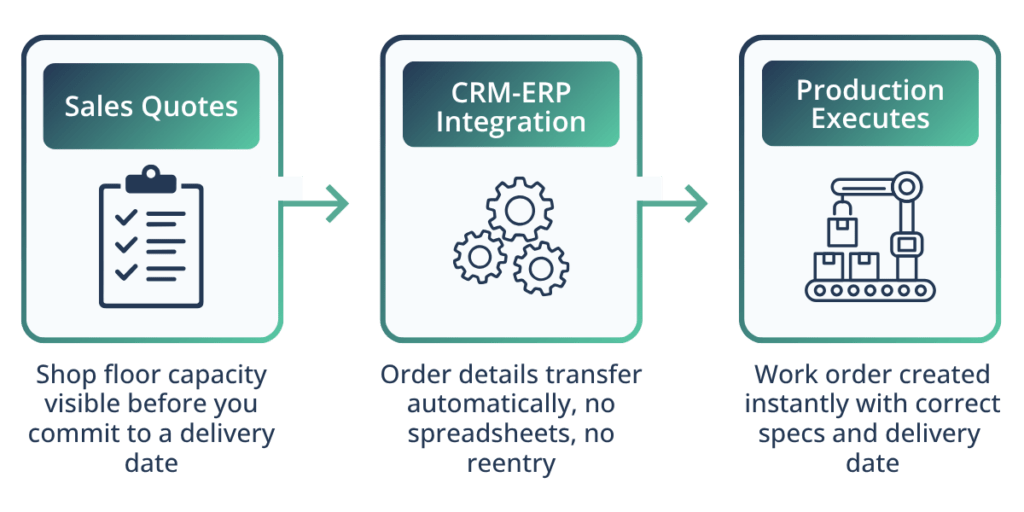
Most manufacturers run CRM and ERP systems separately. Sales enters opportunities in the CRM. Operations manages schedules in the ERP. Someone manually bridges the gap between these systems, usually with spreadsheets and meetings.
“The biggest breakdown typically stems from legacy systems never designed to talk to each other: ERPs, spreadsheets, disconnected manufacturing execution systems, various CRMs. Each is optimized for a silo, not the business as a whole.” – Jordan Joltes, CEO and Founder, TruSummit Solutions
This separation creates three problems that surface every day.
Sales quotes without knowing real capacity. Your sales team cannot see what is already scheduled or where bottlenecks exist. They guess at lead times based on outdated information.
Orders get lost in translation. Someone has to manually rekey order details from the CRM into your production system. Each manual step introduces errors and delays.
Schedule changes do not flow both ways. When production faces a delay or rush order, sales does not know until a customer calls asking about their order.
Integration fixes these gaps by creating a single source of truth that both teams access in real time. For a broader view of how this disconnect affects forecast accuracy and margins, manufacturing sales operations alignment breaks down the root causes and what it takes to close the gap.
What Do You Actually Get From CRM-ERP Integration?
Real-Time Capacity Visibility During Quoting
When your CRM connects to production planning systems, sales reps see available capacity while building quotes. They know which production lines have availability, typical lead times for similar jobs, and where scheduling conflicts might occur.
This visibility changes how you quote new work. Instead of promising arbitrary dates, sales commits to realistic timelines based on actual shop floor capacity. You reduce the back-and-forth between sales and operations that delays quote approval.
The integration pulls data from your ERP’s production schedule and displays it within the CRM interface. Sales does not need to learn a new system or wait for operations to respond to capacity questions.
For a deeper look at what unified pipeline visibility means in a manufacturing context, sales pipeline visibility in manufacturing covers how operations leaders can connect demand signals to production decisions.
Automatic Order Routing to Production Systems
Once a customer accepts a quote, integrated systems automatically convert the opportunity into a production order. Customer requirements, specifications, quantities, and delivery dates flow directly from CRM to ERP without manual reentry.
This automatic routing eliminates a major source of errors. Manual data entry between systems causes wrong quantities, missed specifications, and incorrect delivery commitments. Each error requires rework, delays production, and damages customer relationships.
You also speed up order processing. What once took hours or days of coordination now happens in minutes. Your production team starts work faster because they receive complete, accurate order information immediately.
Schedule Change Notifications Flowing Both Ways
Manufacturing schedules change constantly. Rush orders arrive. Materials are delayed. Equipment breaks down. Your teams need to adapt quickly.
Bidirectional integration means schedule changes in the ERP automatically update the CRM. Sales sees revised delivery dates without calling the shop floor. They can proactively contact customers about delays before customers contact them.
The reverse also works. When sales negotiates a delivery date change with a customer, that update flows into production scheduling. Your planners see the new commitment and can adjust resources accordingly.
This two-way flow prevents the common problem where sales and operations work from different schedules. Everyone sees the same information at the same time.
Unified Dashboard for Pipeline vs. Capacity
Operations leaders need to see both upcoming demand and current capacity in one view. A unified dashboard shows your sales pipeline alongside production schedules, revealing where capacity gaps or overcommitments might occur.
You can spot problems weeks in advance instead of days. If sales is closing deals that will overwhelm a specific production line next month, you see that trend now. You can adjust staffing, prioritize orders differently, or guide sales toward different product mixes.
The dashboard also helps with resource planning. You see which skills or machines face the heaviest demand in the coming weeks. This visibility helps you schedule maintenance during slower periods or cross-train employees before bottlenecks form.
For operations leaders evaluating different integration approaches, understanding which Salesforce edition fits your manufacturing needs provides important context. Manufacturing Cloud versus Sales Cloud offers different production planning capabilities worth examining before you commit to an architecture.
Which Integration Features Actually Impact Production Outcomes?
Not all CRM-ERP integrations deliver the same value for manufacturing operations. Focus on these specific capabilities when evaluating solutions.
Production Management Integration
Work order visibility, scheduling, and shop floor tracking are non-negotiable for manufacturing teams evaluating new systems. This includes work order creation, production status tracking, and capacity planning tools accessible from within the CRM.
Your sales team needs to see work order status without switching systems. When a customer calls asking about their order, sales should pull up real-time production status, see which operations are complete, and provide accurate delivery estimates.
Production management integration also means engineers can route orders directly to specific work centers based on requirements, capabilities, and current workload. The system suggests optimal routing based on capacity and due dates.
Order Management Workflow Automation
Integrated order management goes beyond basic order entry to include partial shipment tracking, backorder management, and automated fulfillment workflows. This is consistently one of the main levers for reducing manual effort and errors in CRM-ERP projects.
When you can only partially fill an order due to material shortages, the system automatically creates backorder tracking, notifies the customer, and schedules the remaining quantity for the next production run.
Rush orders get special routing. When sales flags an opportunity as urgent, the integration can automatically check expedite options, calculate premium costs, and route approved rush orders to the front of production queues.
Inventory Synchronization
Real-time inventory visibility prevents sales from selling products you cannot deliver. Integration syncs finished goods inventory, work-in-process status, and raw material availability between systems.
Sales sees actual inventory levels during quote creation. They know whether you can fulfill from stock or need to schedule production. This prevents sales from promising delivery from inventory that does not exist.
The integration also updates inventory as production completes work orders. When a batch finishes and passes quality inspection, available inventory automatically updates in the CRM. Sales can immediately quote that inventory to waiting customers.
Scheduling and Resource Planning
Tight integration between CRM, ERP, and inventory is what unlocks the benefits of production scheduling: shorter lead times, fewer bottlenecks, and better use of capacity. This includes calendar-based capacity planning, resource allocation tools, and constraint-based scheduling that respects machine and labor availability.
Your planning team uses the integrated schedule to balance workload across production lines. They see which resources face overload and can shift work to underutilized areas. The system flags conflicts before they impact delivery dates.
Some integration platforms now include artificial intelligence (AI)-based demand forecasting that pulls order data from the CRM to predict future capacity needs. These tools help you anticipate demand spikes and plan staffing or materials procurement ahead of time.
What Are the Best Approaches for CRM-ERP Integration in Manufacturing?
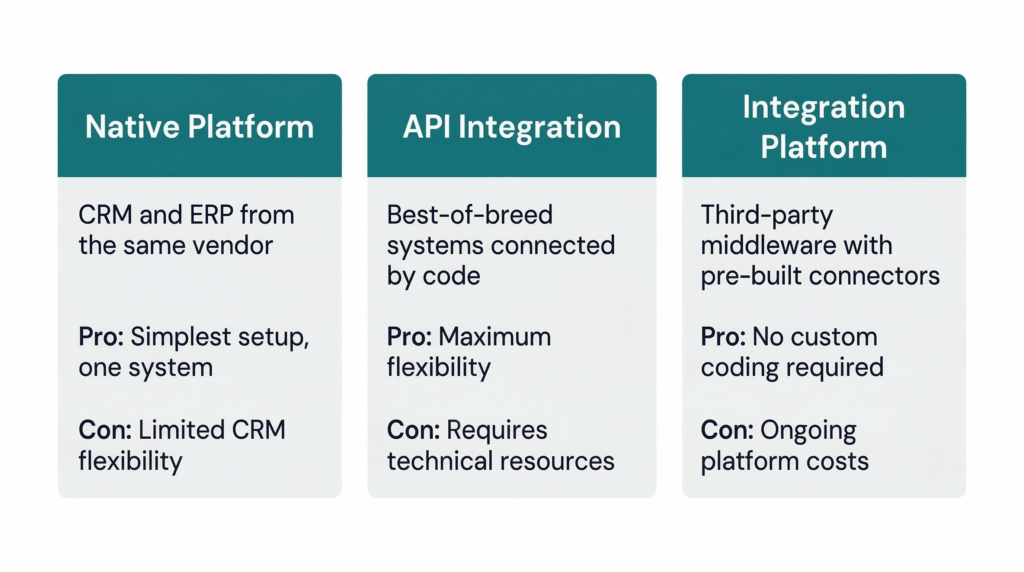
You have several options for connecting CRM and ERP systems. Each approach has tradeoffs around cost, complexity, and flexibility.
Native Integration Within Unified Platforms
Some ERP vendors offer built-in CRM modules that integrate natively with production planning. These unified platforms eliminate separate systems entirely, providing one database for sales, operations, and finance.
The advantage is simplicity. You do not manage integration code or worry about data synchronization. Updates happen automatically because everything runs in one system.
The disadvantage is flexibility. Native CRM modules often lack the sophisticated sales features found in dedicated CRM platforms. You may compromise on CRM capabilities to gain integration simplicity.
API-Based Integration Between Best-of-Breed Systems
Many manufacturers prefer dedicated CRM and ERP systems connected through application programming interfaces (APIs). This approach lets you choose the best CRM for your sales processes and the best ERP for production management, then connect them programmatically.
APIs provide real-time data synchronization. When sales updates an opportunity, the change flows immediately to the ERP. When production completes a work order, inventory updates instantly in the CRM.
This approach requires technical expertise to build and maintain integration code. You need team members who understand both systems and can troubleshoot when data synchronization issues occur.
Integration Platform Solutions
Third-party integration platforms sit between your CRM and ERP, providing pre-built connectors and workflow tools. These platforms handle data mapping, transformation, and synchronization without custom coding.
Integration platforms work well for manufacturers who lack internal development resources. You configure connections through visual interfaces rather than writing code. The platform vendor maintains connectors as your CRM and ERP systems update.
The tradeoff is ongoing platform costs and potential limitations in customization. Standard connectors may not handle your unique workflows without additional configuration.
Multi-plant manufacturers face additional integration complexity when consolidating Salesforce instances. Org consolidation strategies help determine whether centralized or distributed CRM-ERP integration makes sense for your footprint.
How Do You Set Up Integration for Production Planning Success?
Successful integration requires more than connecting systems. You need to configure workflows that match how your teams actually work.
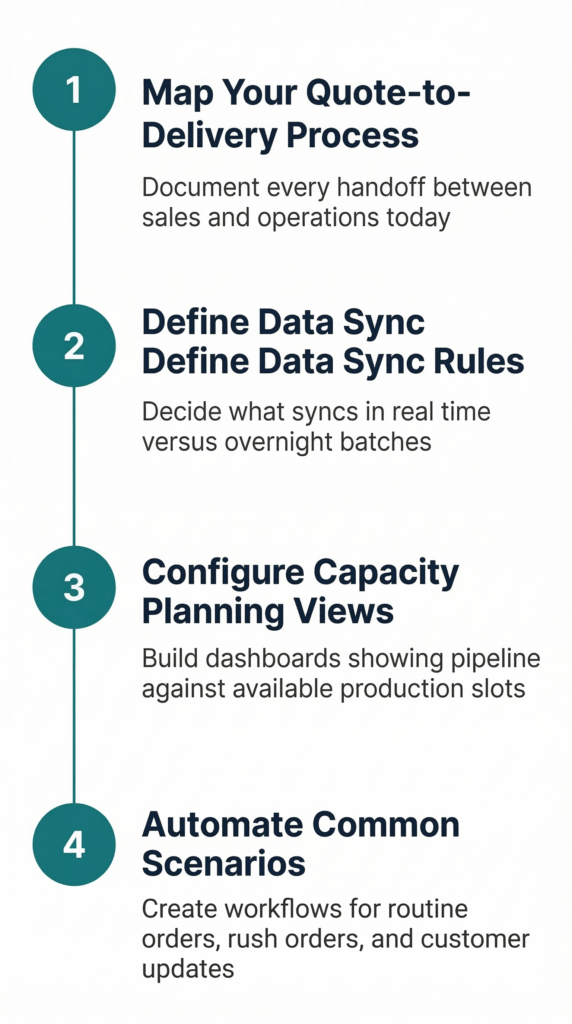
1. Map Your Quote-to-Delivery Process First
Before configuring integration, document your complete quote-to-delivery workflow. Identify where information currently moves between systems and who enters data at each step.
Look for handoffs that cause delays. These are often where the sales process ends, and operations begin. Integration should eliminate these handoffs by automatically moving information forward.
Involve both sales and operations in process mapping. Each team sees different bottlenecks and pain points. You need input from both sides to design integration that helps everyone.
2. Define Data Synchronization Rules
Determine which data needs real-time synchronization versus batch updates. Customer information, order details, and inventory levels usually require real-time sync. Historical reporting data might update in nightly batches.
Establish data ownership rules. Decide whether the CRM or ERP is the master source for each data type. Customer contact information typically lives in the CRM. Production schedules live in the ERP. Clear ownership prevents conflicts when data differs between systems.
Set up error handling for synchronization failures. Integration will occasionally fail due to network issues or data validation problems. Your team needs alerts when sync errors occur and procedures for resolving them quickly.
3. Configure Capacity Planning Views
Build dashboard views that show the sales pipeline against production capacity. Group opportunities by expected close date and compare them to available production slots in those same time periods.
Include filters for different product lines or production processes. You may have plenty of capacity in one area while facing constraints in another. Granular views help you identify specific bottlenecks.
Set up alerts for capacity conflicts. When the sales pipeline exceeds available capacity by a threshold you define, the system should notify both sales and operations leadership. Early warning gives you time to expand capacity or manage customer expectations.
4. Create Automated Workflows for Common Scenarios
Design automatic actions for repetitive processes. When an opportunity reaches a specific stage, the integration can automatically generate production quotes, reserve capacity, or create preliminary material requirements.
Build exception handling for urgent orders. Fast-track workflows should bypass standard approval queues and route rush orders directly to production planning with appropriate notifications.
Set up customer communication triggers based on production milestones. When a work order completes key operations, the CRM can automatically send status updates to customers. This keeps customers informed without manual sales team effort.
Organizations preparing for integration should ensure their CRM foundation supports advanced workflows. AI readiness for manufacturers provides a technical checklist covering data quality and system configuration that applies equally well to integration readiness.
What Are the Most Common CRM-ERP Integration Mistakes?
Avoid these problems that reduce integration value and extend implementation timelines.
Over-Customizing Initial Integration
Start with standard integration workflows that handle 80% of your scenarios. Solve common cases first before building custom logic for edge cases.
Excessive customization increases implementation time and creates a maintenance burden. Every custom workflow needs testing when either system updates. Keep integration simple until you prove value from basic connections.
Failing to Clean Data Before Integration
Integration exposes data quality problems. If your CRM contains duplicate customer records or your ERP has inconsistent part numbering, those issues multiply when systems connect.
Clean your data before integration. Merge duplicate records, standardize naming conventions, and verify that key fields contain accurate information. TruSummit’s Salesforce data cleanup checklist for manufacturing provides a step-by-step process for getting your instance ready before you connect systems.
Ignoring Change Management
Integration changes how both teams work. Sales loses some autonomy around delivery commitments. Operations receives orders faster and must adapt scheduling processes.
Train both teams on new workflows before launching integration. Explain what changes and why it benefits them. Sales needs to understand capacity views. Operations needs to know how orders will arrive from the CRM.
Create feedback mechanisms so teams can report integration issues. Early identification of workflow problems prevents small issues from becoming major frustrations.
Neglecting Ongoing Maintenance
Integration requires continuous attention. As business processes evolve, your integration logic needs updates. When either system adds features or changes data structures, integration may need adjustments.
Assign clear ownership for integration maintenance. Someone needs responsibility for monitoring sync errors, updating workflows as processes change, and coordinating system updates between CRM and ERP teams.
How Do You Get Started With CRM-ERP Integration?
“Start by anchoring to a specific business outcome: improving on-time delivery or increasing forecast accuracy. Then identify the minimal connections required to make that outcome possible. It’s about creating value quickly, showing impact, and scaling iteratively.” – Jordan Joltes
Begin with a pilot project that tests integration on a limited product line or customer segment. Choose an area with straightforward production processes and willing participants from both sales and operations.
Define success metrics before starting. Establish baseline measurements for order processing time, quote accuracy, and on-time delivery in your pilot area. Track how integration changes these metrics over the first 90 days.
Document workflows and decisions during the pilot. This documentation becomes your template for expanding integration to additional product lines or facilities.
Plan for a phased rollout rather than a company-wide implementation. Each phase should add capabilities or expand scope based on lessons learned from previous phases. This approach reduces risk and builds organizational confidence in the integrated system. The manufacturing digital transformation roadmap outlines how to sequence these phases over 12 to 18 months so each builds on the last without overwhelming your team.
Strong ongoing support helps maximize your integration investment. Salesforce managed services provide technical expertise for maintaining and enhancing production planning integrations over time.
Moving Forward With Integration
CRM-ERP integration connects your sales pipeline directly to production capacity. You gain visibility into what is committed versus what is available, eliminate manual order handoffs, and keep both teams working from the same schedule.
Your next step is assessing whether your current CRM and ERP can support the integration capabilities you need. Talk with a TruSummit consultant about your integration options, data synchronization requirements, and what a realistic implementation timeline looks like for manufacturers at your stage.
Featured Articles
Paying Down Salesforce Technical Debt: A Cleanup Roadmap for Manufacturing CRMs
Summary: You inherited a Salesforce instance that feels like a house of cards. Your sales team complains that order data…
CRM and ERP Integration for Manufacturing: What Ops Leaders Need to Know Before They Start
Key Takeaways CRM-ERP integration for manufacturing connects your CRM system directly to your ERP system, giving sales real-time production capacity…
AI-Powered Demand Forecasting: Moving Manufacturing Beyond Spreadsheet Guesswork
Summary Your plant manager walks into Monday morning’s production planning meeting with the same question: “How confident are we in…