


The Problem with Record Types
If you have automations on Objects with Record Types, odds are, you have Flows or Apex that look like this:
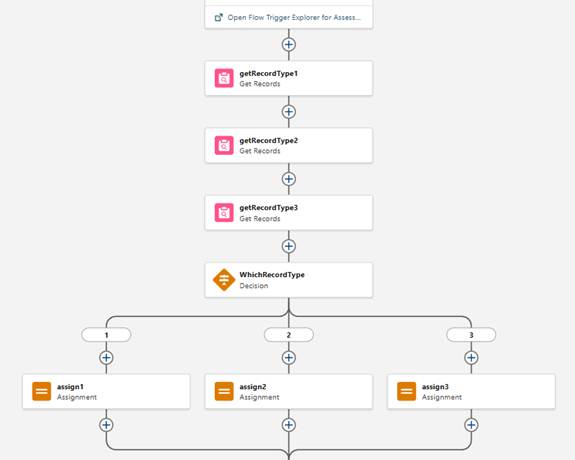
Where you need to get all your Record Types, then assess what to do with each one, committing your record to multiple queries when only one of them will qualify. I’m here to tell you there’s an easier way, and it’s so simple, I’m embarrassed to say how many flows I made in the past that look like this because of record types.
The Solution with a Record Type Formula
Create a formula field on any object that uses Record Types with the following formula: RecordType.DeveloperName. You can also use RecordType.Name if your team prefers display names – but DeveloperName is safer for automation and comparisons, as it doesn’t vary by translation.
How to:
- Go to Setup > Object Manager
- Select the object (e.g., Case, Opportunity, CustomObject__c)
- Go to Fields & Relationships
- Click New Field
- Choose Formula
- Set return type to Text
- Enter the formula: RecordType.DeveloperName
- Name it something like Record Type API Name, or Record Type Developer Name
- Add it to your page layout or keep it hidden (I recommend keeping it hidden).
Why This Field is Valuable
In Flows
- No need to query Record Type Ids every time the flow runs
- Easier to maintain and deploy between environments
In Apex
- No SOQL queries needed to get the Record Type Ids
- Debugging logs become more readable
Gotchas to Watch Out For
Before Save Flows and Apex
- Because formula fields are evaluated after the record is saved, you won’t be able to use this method on a before flow or apex trigger when the record is being created, as the formula won’t have the value you’re looking for yet.
- You should also be careful with using the formula in a before flow or apex trigger where the conditions involve the record type updating, for the same reason.
- For the best results, you should only use this formula field in after save automations, and continue to query for the record types in before save automations.
Validation Rules
- I would also avoid using the formula field in validation rules, since validation rules are assessed before formula fields.
Conclusion
Creating the Record Type API Name formula field is a tiny change with a huge payoff. It improves, makes your automations more efficient, and saves time. If you’re managing an org with Record Types on objects with high amounts of automation, make this a standard part of your toolkit.
Featured Articles

Should You Wait on Salesforce Until Your ERP Is Stable?
Should You Wait on Salesforce Until Your ERP Is Stable? An ERP implementation can make it feel like every other…

TruSummit Solutions: From Spreadsheet Chaos to Salesforce: A Manufacturer’s CRM Migration Roadmap
A Salesforce CRM migration is not primarily a data-transfer project. For mid-market manufacturers, it is an opportunity to define what…

Inside the Pipeline: How Contract Extraction Actually Runs on MuleSoft IDP
A technical walkthrough of the trigger, the authentication, and the operational levers behind the contract data pipeline we described last…